There is no automatic layout engine in the NeL interface: every element pins itself to an anchor and optionally follows a size reference. It is a small model (nine hotspots, an offset, and a fractional size follow), and everything on screen is built from it.
¶ The coordinate system
Interface coordinates are in pixels with y pointing up: y="0" at an element's anchor, positive y moves toward the top of the screen, negative y moves down. Interface authors spend their lives writing y="-12" to move things down; this is normal.
Every element carries two sets of coordinates: the declared x/y/w/h (relative, as authored) and the computed x_real/y_real/w_real/h_real (absolute screen pixels, y-up from the bottom-left of the canvas). The real values are what scripts and hit tests read; they are exposed to Lua and <link> targets as reflected properties.
¶ Hotspots and posref
Each element has nine hotspots (corners, edge midpoints, and center):
TL  TM  TR
ML  MM  MR
BL  BM  BR
posref="PARENT SELF" pins the element's SELF hotspot onto the parent's PARENT hotspot. The default is BL BL. A single value sets both. x/y then offset from that pinned point.
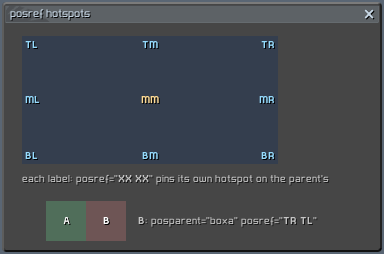
Reading the pair aloud helps: posref="TR TL" = "my top-left on the parent's top-right", so the child hangs off the parent's right edge, tops aligned. This is how rows are chained (each element's posparent is the previous one):
<view type="text" id="a" posref="TL TL" x="12" y="-10" ... />
<view type="text" id="b" posparent="a" posref="BL TL" y="-4" ... />   <!-- below a -->
<view type="text" id="c" posparent="b" posref="MR ML" x="8" ... />    <!-- right of b, vertically centered -->
¶ posparent
By default position is relative to the containing group. posparent="someid" anchors to any sibling instead (resolved as a short id within the same group, or a full ui:... id). posparent="parent" is the explicit default. Parent resolution is deferred to the end of parsing, so an element may name a sibling declared later in the file.
¶ Size: w, h and sizeref
w/h set the size in pixels. Two behaviors to know:
- Default size is the parent's size, not zero, when the element sits inside a group. An element with no
wat all follows its parent width silently. - With
sizeref, the axis follows a size reference element andw/hbecome additive deltas.sizerefis a string ofwand/orh, each optionally followed by a digit meaning tenths:
| sizeref | meaning |
|---|---|
wh |
follow reference width and height fully |
w |
follow width; w="-24" = reference width minus 24 px |
w5 |
half (5/10) of the reference width |
h3 |
3/10 of the reference height |
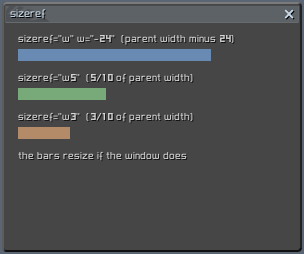
The reference element defaults to the parent (or the posparent); sizeparent="id" selects another element. max_sizeref/max_sizeparent apply the same mechanics to an element's maximum size (useful with scrolling lists).
A classic full-width row inside a padded window:
<group id="log" posref="TL TL" x="12" y="-8" sizeref="w" w="-24" h="122"> ... </group>
Text views don't obey
w. Atype="text"view zeroes itsw/hand sizes itself from its content. For multi-line text the wrap width ismin(parent inner width, line_maxw); setline_maxwfor a narrower column, a plainwattribute does nothing.multi_line_maxw_only="true"makesline_maxwabsolute.
¶ Common element attributes
Parsed by every view, control and group:
| attribute | default | meaning |
|---|---|---|
id |
required | element name; full id = parent:id |
active |
true |
drawn and interactive; inactive elements take no space decisions either |
x, y |
0 |
pixel offset from the posref anchor (y-up) |
w, h |
parent size, else 0 | size, or delta when sizeref covers the axis |
posref |
BL BL |
hotspot pair "parent self" |
posparent |
parent group | anchor element |
sizeref / sizeparent |
none | size follow, see above |
global_color |
true |
modulate by the global interface color |
render_layer |
0 |
draw sub-layer within the window; higher draws later (on top). The inventory demo uses render_layer="1" for its slot glow and a high layer for the drag ghost |
avoid_resize_parent |
false |
exclude from the parent's child_resize_* computation |
Groups additionally understand child_resize_w/child_resize_h (auto-size the group to enclose its children, plus child_resize_wmargin/hmargin), max_w/max_h clamps, and window-level attributes covered in Windows and containers.
¶ Stamping rows and grids:
<vector> clones a template instance N times with $i index substitution and automatic position chaining. This is how the showcase builds the Minesweeper board (81 cells), the console log and the inventory grid without 81 hand-written elements:
<vector template="doc_vec_cell" _size="8" _firstindex="0" _firstpos="TL TL"
        _xfirst="0" _yfirst="0" _nextpos="TR TL" id="c$i" i="$i" x="0" y="0" />
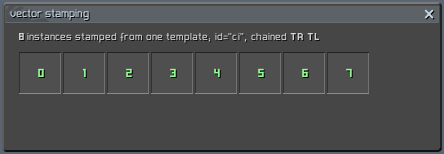
_sizesets the clone count;_firstindex(default 0) and_step(default 1) drive the$ivalues.$iis replaced in every attribute: ids, template params, positions._firstposis the first clone's posref;_nextposthe posref of every later clone, whoseposparentis automatically set to the previous clone's id, so_nextpos="TR TL"builds a left-to-right row and"BL TL"a top-down stack. Both must be present for chaining;_xfirst/_yfirstoverridex/yon the first clone only.- Grids are two (or more) vectors with different
_firstindexand_yfirst, as in the inventory's two bag rows.
Remember the posref reading order: parent hotspot first. A left-to-right chain is TR TL ("my TL on the previous one's TR"), not TL TR.
Templates themselves (declaring one, parameter defaults, #param substitution) are covered in Interface XML structure.